

AI builders can produce a smart-looking law firm website in minutes. Whether that site will ever bring in enquiries from Google or AI search is a different question. Here’s when an AI-built site is fine, when it holds your firm back, and how to check yours.
By Jon Budge, Head of Digital Marketing & Client Strategy · Last updated: 13/10/2026
Key takeaways
- An AI-built site is fine for a simple brochure site, a holding page or a firm that wins work mainly through referrals.
- Many AI app builders produce client-side rendered sites, where the content only appears after JavaScript runs. Google can process that eventually, but it adds delay and risk.
- The major AI crawlers, including those behind ChatGPT and Claude, don’t run JavaScript, so a client-side rendered site can look blank to them.
- Lead generation for a law firm depends on many individual, crawlable pages: practice areas, sub-services, locations and lawyer profiles. That’s hard without a proper CMS.
- You can check your own site in two minutes with ‘View page source’ and Google Search Console.
Contents
- What is an AI-built website?
- When an AI-built site is perfectly fine
- Why AI-built sites fall short when you need leads
- What this means for law firms specifically
- AI builder vs professionally built WordPress site
- How to check if your site has a rendering problem
- Already launched on an AI builder? What to do next
- Expert tips
- Common mistakes
- FAQs
- Glossary
Introduction
If you run a law firm, you’ve probably seen the adverts. Describe your practice to a chatbot and a few minutes later you’ve got a polished website, practice area pages and all. Some builders aimed at lawyers go further and tell you to skip the agency altogether.
For some firms, that’s a sensible choice. For firms that want their website to bring in new enquiries, AI website builder SEO is where the cracks start to show. Many of these tools create sites that look finished to a visitor but are close to empty when a search engine visits.
That matters more now that people are asking ChatGPT and Gemini to recommend a solicitor. The crawlers behind those tools don’t run JavaScript at all.
This guide is for partners, practice managers and marketing leads deciding how to build or rebuild their firm’s site. We’ll cover when an AI-built site does the job, where it lets you down, and how to check the site you already have.
We work only with law firms and have designed and built over 50 law firm websites, so we see both sides of this every week. If you’d rather talk it through, our law firm website design team is happy to help.
What is an AI-built website?
An AI-built website is one where you describe what you want in plain English and the tool generates the design, the copy and the code. You change it by asking again, not by editing pages yourself.
That label covers two quite different kinds of tool, and the difference matters for SEO.
| AI app generators | Website builders with AI features | |
| Examples | Lovable, Base44, v0, Bolt | Wix, Squarespace, WordPress-based AI tools |
| What the AI produces | A JavaScript application, often built in React | Pages within an existing website platform |
| How content reaches the browser | Usually rendered in the browser after JavaScript runs | Usually served as ready-made HTML |
| How you edit | Prompts, often paid for in credits | A page editor, with AI as an optional helper |
The rendering problem we cover below sits mostly with the first group. Prerender.io, which sells a fix for exactly this, explains that Lovable sites are typically client-side rendered, so crawlers first receive a near-empty page while JavaScript fills in the content.
The second group avoids most of that. They have their own limits for lead generation, though, which we’ll come to.
When an AI-built site is perfectly fine
We’re not going to tell you AI builders are useless. They aren’t. For some firms, they’re the right tool, as long as you know what you’re getting.
You need a simple brochure site, fast
A new sole practitioner often just needs something credible online while the practice gets going. A few pages explaining who you are, what you do and how to get in touch can be enough. If most of your first instructions will come from people you already know, a quick AI-built site does that job.
Your work comes through referrals, not search
Some practices rarely win work from Google. A niche commercial lawyer whose clients arrive through introducers mainly needs a site that reassures people who’ve already heard the name. Rankings matter less here.
You need a holding page
Rebranding, merging or waiting for a full build? A temporary site keeps you visible in the meantime. Just plan the switch to the permanent site carefully so you don’t lose anything.
You want to explore designs before briefing an agency
This is one of the best uses we’ve seen. Trying a few layouts in an afternoon helps you work out what you like, and makes for a much clearer brief to a designer.
One caveat applies to all of these. A law firm website still needs its regulatory information, so check the SRA’s rules on what to publish are met, whichever tool you use.
AI website builder SEO: why it falls short when you need leads
Once the website’s job changes from ‘look credible’ to ‘bring in new clients’, the picture changes. Four problems come up again and again when we audit AI-built law firm sites.
The JavaScript rendering problem
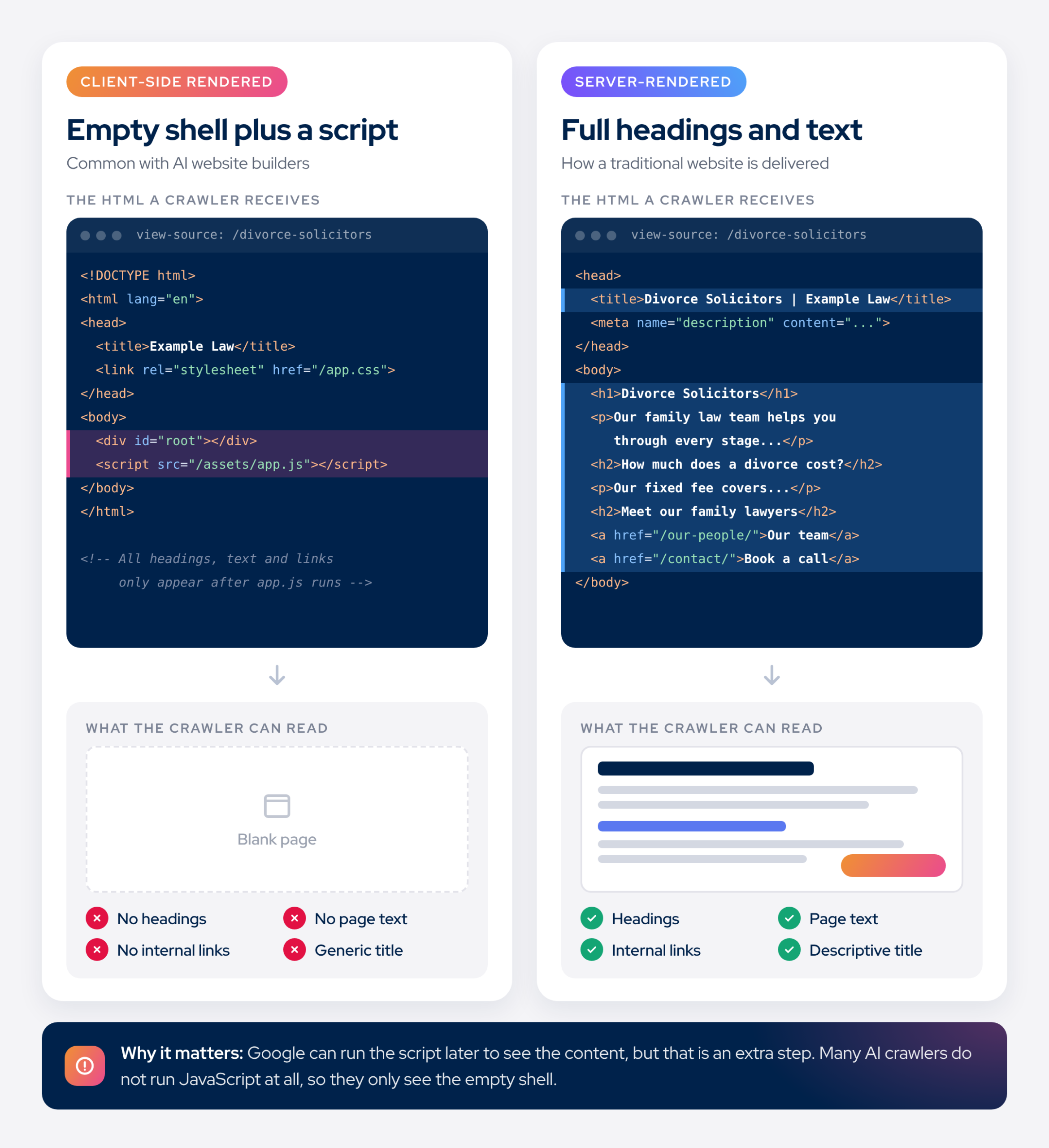
A traditional website sends a finished page to whoever asks for it. Your headings, service descriptions and contact details are all there in the HTML from the start.
A client-side rendered site works differently. It sends a near-empty shell and a bundle of JavaScript, and the visitor’s browser builds the page. People never notice. Search engines do.
Google handles this in stages. It crawls the page, puts it in a queue for rendering, runs the JavaScript when it has the resources, then indexes what it finds. Google’s own documentation says a page may sit in that queue for a few seconds or longer. It still recommends server-side rendering or pre-rendering, partly because not every bot can run JavaScript.
That last point is the bigger risk now. Vercel and MERJ studied live crawler traffic and found none of the major AI crawlers rendered JavaScript, including OpenAI’s and Anthropic’s. In a single month, OpenAI’s GPTBot made 569 million requests across Vercel’s network and Anthropic’s crawler made 370 million. Not one ran the JavaScript it fetched.
So if a prospective client asks ChatGPT for a family solicitor in your town, a client-side rendered site may have nothing for it to read.
Navigation can cause trouble too. Google says it can only discover links that are proper HTML <a> elements with an href attribute. If an AI tool builds menus from clickable elements that aren’t real links, some of your pages may never be found.
How to spot a JavaScript-built site
You don’t need to read any code to get a hint of whether a site is built this way. Click through the menu on your own website and watch what happens.
On a traditional site, each click loads a new page. There’s a brief flicker or pause, and the address in your browser’s bar changes to show where you are, for example /divorce-solicitors.
On many JavaScript-built sites, the experience is smoother. Click “Services” and the content slides or fades in with no reload at all, and the address bar often stays exactly where it was. It feels slick, but behind the scenes the site is swapping content in and out of one page rather than moving you between separate pages.
Signs your site may work this way:
- Pages change with smooth transitions and no reload
- The web address doesn’t change as you move around the site
- Clicking the back button takes you away from the site, rather than to the previous section
If you spot any of these, the ‘View page source’ check below will tell you more.
No proper content management system
SEO isn’t a one-off job. Titles get tested, pages get expanded, new services get added and team members come and go. On WordPress or a similar content management system (CMS), anyone with a login can make those changes in minutes.
Many AI app builders don’t work that way. Every change is a new prompt, and many platforms charge credits per edit. Asking the AI to change one heading can also alter things you didn’t ask it to touch, so each round needs checking.
Metadata is a common casualty. Lovable’s own guidance, as summarised by Prerender.io, notes that page titles and descriptions don’t update per page unless you set that up specifically. Out of the box, every page can end up sharing one title.
You can’t build out individual pages properly
This is the one that hurts lead generation most. Law firms rarely rank with a homepage. They rank with focused pages that match what people search for, such as ‘divorce solicitor Nottingham’ or ‘no win no fee employment tribunal’.
A site built to win those searches usually has:
- a page for each practice area
- sub-service pages under each one (divorce, financial settlements, child arrangements)
- location pages where you serve several areas
- a profile page for each lawyer
- guides and insights that answer clients’ questions
Each of those needs its own URL, title, meta description, heading structure, internal links and schema markup. Creating forty well-built pages one prompt at a time is slow, and keeping them consistent is harder still. B12, itself an AI builder, admits many of these tools recycle the same layouts and text across pages. Near-identical pages give Google little reason to rank any of them.
Ownership, access and lock-in
AI-built sites often start life in one person’s account. Compose.ly describes a client whose marketing head built the site on her personal account and then left. The firm had to untangle ownership while its SEO recommendations sat untouched.
Moving off the platform later can mean a full rebuild. Check before you start whether you can export your content and code, and who controls the domain and hosting.
What this means for law firms specifically
Everything above applies to any business. A law firm has a few extra reasons to be careful.
Regulated content needs to be easy to update. Firms offering services such as residential conveyancing, probate, employment tribunal claims and motoring offences must publish price and service information under the SRA Transparency Rules. Those figures change. If every update costs credits or risks breaking other pages, they tend not to get done.
Mandatory information has to be right. Regulatory details in the footer, the SRA digital badge, a complaints procedure with a link to the Legal Ombudsman, and a UK GDPR-compliant privacy and cookie policy. An AI tool won’t know these rules unless you tell it.
Legal content is held to a higher standard. Google treats legal topics as ‘Your Money or Your Life’ content, where it looks harder for signs of experience, expertise and trust (Google Search Central). Named lawyer profiles, credentials and genuine expertise matter here, and generic AI copy rarely delivers them.
Enquiries have to be tracked. In our experience, phone calls remain the main way legal clients get in touch, and forms that quietly fail are one of the most common faults we find in audits. Call tracking, form testing and CRM connections are much easier on a platform you fully control.
AI builder vs professionally built WordPress site
Here’s how a typical AI app builder compares with a law firm site built properly on a CMS such as WordPress. Individual tools vary, so treat this as a guide rather than a verdict on any one product.
| AI app builder | Professionally built WordPress site | |
| Time to launch | Hours or days | Weeks to a few months |
| Upfront cost | Low: subscription plus credits | Higher: design, build and content |
| How content is delivered | Often rendered in the browser by JavaScript | Served as complete HTML |
| Visible to AI crawlers | Often not, if client-side rendered | Yes |
| Adding practice area and location pages | One prompt at a time, hard to keep consistent | Built from templates, easy to scale |
| Editing titles and meta descriptions | Prompts or credits, sometimes not per page | Per page, by anyone with a login |
| SRA price and service updates | Each change goes through the AI | Edited directly in minutes |
| Lead tracking and integrations | Limited by the platform | Call tracking, CRM and analytics as needed |
| Ownership | Tied to the platform, sometimes one person’s account | Your domain, your hosting, your files |
| Best for | Brochure sites, holding pages, design ideas | Firms that want the website to win new work |
How to check if your site has a rendering problem
You don’t need to be technical to find out. These checks take a few minutes.
- View the page source. Open one of your service pages, right-click and choose ‘View page source’ (Ctrl+U on Windows, Cmd+Option+U on a Mac). Search for a sentence you can see on the page. If it isn’t in the source, the content is being built by JavaScript.
- Use Google Search Console. Run the URL Inspection tool on the same page and look at the crawled HTML. Google recommends this check for seeing what it can actually read.
- Search with site:. Type site:yourfirm.co.uk into Google. Count the results and look at the titles. Too few pages, or the same title repeated, both point to a problem.
- Turn JavaScript off. Disable JavaScript in your browser settings and reload the page. A blank or half-empty screen is roughly what an AI crawler sees.
Already launched on an AI builder? What to do next
Don’t panic. A rendering problem is fixable, and you can usually keep the design you like.
In the short term:
- make sure every page has its own title and meta description in the HTML, not added by JavaScript
- consider a pre-rendering service, which serves crawlers a ready-made HTML copy of each page. Google describes this as a workaround rather than a long-term fix
- submit an XML sitemap in Search Console and watch which pages actually get indexed
In the longer term, plan a move to a platform you control. Done carelessly, a migration is one of the most common causes of lost rankings, so it needs a proper redirect map and a pre-launch audit.
Our SEO team can audit what your current site is showing to Google and AI crawlers. If a rebuild makes sense, our website design team can rebuild it on WordPress, carry your design across and map every redirect.
Expert tips
Format each as a callout box.
Tip 1: Test a builder before you commit. Open a few of the showcase sites a builder links to and view their page source. If the text isn’t there, yours won’t be either.
Tip 2: Put everything in the firm’s name. The domain, hosting and every admin login should belong to the firm, not to one person. It costs nothing now and saves a lot of pain later.
Tip 3: Plan your pages before your design. List every practice area, sub-service and location you want to win work for. That list should shape the site, rather than the other way round.
Tip 4: Use AI for ideas, not foundations. AI tools are great for trying layouts or drafting a first pass at copy. Build the live site on a platform you control, and have a lawyer check every word.
Tip 5: Test your enquiry routes every month. Submit your own contact form and ring your own number. A form that silently fails costs you clients without anyone noticing.
Common mistakes
Trusting the ‘SEO-optimised’ label. Almost every builder claims it. What it usually means is tidy headings and meta tags, which doesn’t help if crawlers can’t read the content. Check for yourself instead.
Putting every service on one page. A single ‘Our services’ page can’t rank for divorce, conveyancing and wills all at once. Give each service its own page with real depth.
Building on a personal account. When that person leaves, access and ownership can leave with them. Register everything to the firm from day one.
Forgetting the regulatory information. An AI tool won’t add your SRA number, digital badge or complaints procedure unless you ask. Missing them is a compliance problem, not just an SEO one.
Launching without Search Console. Without it, you won’t know which pages Google has indexed or why others haven’t been. Set it up on launch day.
Moving platforms without redirects. Changing every URL without a redirect map throws away the rankings you’ve built. Map old pages to new ones before you switch.
Assuming Google and AI search behave the same. Google can render JavaScript eventually. The crawlers behind ChatGPT and Claude can’t. A site that ranks on Google can still be invisible in AI answers.
FAQs
Are AI website builders good for SEO?
Some are fine for basic SEO, but few are strong enough for a law firm that relies on search for new clients. Builders that add AI to a traditional platform usually serve readable HTML, so the main limits are flexibility and page depth. AI app generators that build JavaScript applications carry more risk, because their content may only appear once the code runs. For a brochure site, either can work. For lead generation, you need a site where every page is readable, editable and built around what clients search for.
Can Google read JavaScript websites?
Yes, eventually, but it’s a slower process. Google crawls a page, adds it to a rendering queue and only indexes the full content once it has run the JavaScript. Its own documentation says a page may wait in that queue for a few seconds or longer. Google still recommends server-side rendering or pre-rendering, because it’s faster for users and crawlers and not every bot can run JavaScript. If your content is in the HTML from the start, you avoid the risk entirely.
Can ChatGPT see my website?
It depends on how your site is built. A study by Vercel and MERJ found none of the major AI crawlers, including OpenAI’s GPTBot and Anthropic’s ClaudeBot, render JavaScript. If your site sends its content as ordinary HTML, those crawlers can read it. If it relies on JavaScript to build each page in the browser, they may see an almost empty page. With more people asking AI tools to recommend a solicitor, that’s a growing gap. The ‘View page source’ test in this guide gives you a quick answer.
Is Lovable bad for SEO?
Lovable is great for building apps quickly, but its default set-up isn’t ideal for SEO. Its sites are typically client-side rendered, so crawlers first receive a near-empty page. Lovable’s own guidance also notes that titles and descriptions don’t update per page unless you configure it. Workarounds exist, such as pre-rendering services, but they add cost and complexity. For a law firm site meant to rank for many services and locations, a platform that serves complete HTML is simpler and more reliable.
Do AI website builders work for solicitors?
They can, for the right job. A new sole practitioner who needs a credible online presence quickly, or a referral-led practice, may find an AI builder perfectly adequate. Problems start when the website needs to win work from search. That usually means dozens of well-built pages, regular updates to SRA price information, accurate regulatory details and reliable enquiry tracking. Those are much harder to manage on a tool where every change goes through a prompt. Decide what you need the site to do before you choose how to build it.
What is client-side rendering?
Client-side rendering means the visitor’s browser builds the page using JavaScript, rather than the server sending a finished page. The first file that arrives is mostly empty, plus instructions for creating the content. For a person with a modern browser, it looks the same. For crawlers, it’s different: Google has to queue the page for rendering, and many other bots, including AI crawlers, don’t run the JavaScript at all. Server-side rendering, which WordPress and most traditional platforms use, sends the full content straight away.
What’s the difference between a brochure site and a lead generation site?
A brochure site tells people who already know your name what you do and how to reach you. A lead generation site is built to be found by people who don’t know you yet. That means a page for each service and location, content that answers client questions, strong trust signals and tracking for every call and form. A brochure site might have five pages. A lead generation site for a multi-service firm can easily need fifty or more, each optimised for search.
Can I fix an AI-built site without rebuilding it?
Sometimes, in part. Making sure each page has its own title and description in the HTML helps, and a pre-rendering service can serve crawlers a ready-made copy of each page. Submitting a sitemap and monitoring indexing in Search Console will show whether the fixes work. These are patches, though. If you need to add many pages, update regulated content often or track enquiries properly, moving to a platform you control is usually the better long-term answer.
Will I lose rankings if I move from an AI builder to WordPress?
Not if the move is handled properly. Rankings drop after a migration when URLs change without redirects, content gets thinner or pages disappear. A good migration starts with an audit of every existing page, keeps or improves the content and maps each old URL to its new home. If your AI-built site has rendering problems, a well-planned move often improves visibility, because Google and AI crawlers can finally read everything.
Why does a law firm website need so many pages?
Because people search for specific problems, not for law firms in general. Someone looking for a ‘child arrangements solicitor’ wants a page about exactly that, not a list of everything your family team does. Separate pages for each practice area, sub-service and location let you match those searches closely. Lawyer profiles add the expertise and trust signals Google looks for on legal topics. Each page gives you another chance to be found.
Does an AI-built website meet SRA requirements?
Not automatically. The SRA Transparency Rules require firms offering certain services, including residential conveyancing, probate and employment tribunal claims, to publish price and service information. Every firm also needs its regulatory details, the SRA digital badge and a complaints procedure with a link to the Legal Ombudsman. An AI tool will only include these if you ask, and it won’t check they’re accurate. Whoever builds your site, a compliance review before launch is essential.
How much does a professionally built law firm website cost?
It depends on the number of pages, the amount of content and how bespoke the design and functionality need to be. A small launch site for a new firm costs far less than a multi-office site with dozens of practice area pages. At Marketing Lawyers, all costs are agreed in advance with no hidden fees. Compare quotes on what’s included, such as content, SEO set-up and compliance review, not just the headline figure.
Can I use AI to build my site without the SEO problems?
Yes, if you use it for the right parts. AI is useful for exploring layouts, drafting first versions of copy and generating ideas for content. Google’s guidance says using AI to create content isn’t against its rules, as long as the result is helpful and people-first. The live site itself should sit on a platform that serves complete HTML and lets you edit every page. Have a qualified lawyer check any AI-drafted legal content before it goes live.
Glossary
| Term | Definition |
| AI app generator | A tool such as Lovable or Base44 that writes a whole web application from a text prompt |
| Client-side rendering (CSR) | The browser builds the page with JavaScript after it loads, so the first file a crawler receives is mostly empty |
| Server-side rendering (SSR) | The server sends a finished page with all its content already in the HTML |
| Pre-rendering | Creating ready-made HTML copies of JavaScript pages to serve to crawlers |
| Single-page application (SPA) | A site that loads once and swaps content in with JavaScript, rather than loading separate pages |
| Crawler | Software that visits web pages to read and store them, such as Googlebot or GPTBot |
| Rendering queue | Where Google holds pages waiting for their JavaScript to be run before indexing |
| Indexing | Adding a page to a search engine’s database so it can appear in results |
| Content management system (CMS) | Software such as WordPress that lets you create and edit pages without touching code |
| Title tag and meta description | The page title and short summary that usually appear in search results |
| Schema markup | Code that labels information on a page, such as a firm’s address or an FAQ, for search engines |
| XML sitemap | A file listing the pages you want search engines to find |
| Generative Engine Optimisation (GEO) | Making your content easy for AI tools such as ChatGPT and Gemini to find and cite |
| E-E-A-T | Experience, expertise, authoritativeness and trust: qualities Google looks for, especially on legal topics |
| YMYL | ‘Your Money or Your Life’: topics such as law, health and finance, where Google applies higher standards |
Call to action: not sure what your website is showing Google?
We work only with law firms, and we’ve designed and built over 50 law firm websites. Every site we build includes SEO, schema markup and SRA compliance as standard, not as extras. If you’re unsure whether your current site is visible to Google and AI search, or you’re weighing up an AI builder, we’ll give you an honest view. No hard sell, and we’ll tell you if you don’t need us.
Call 0330 133 8783, email info@marketinglawyers.co.uk or book a free call.
Disclaimer
This guide is general information about website design and marketing. It isn’t legal or regulatory advice. Check the SRA’s current guidance, or take compliance advice, before publishing regulated information on your website.